
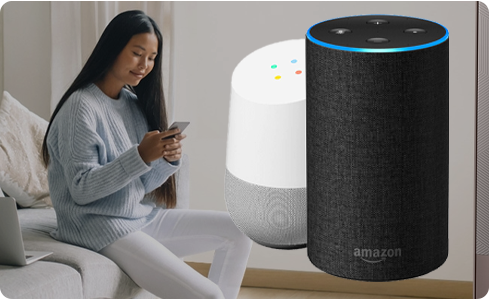
Imagine a world where your dishwasher can start its cycle with just a simple voice command. You walk into your kitchen, say a few words, and your dishes are getting cleaned while you enjoy your favorite show or prepare dinner.
Sounds like magic, right? But it’s not—it’s the power of smart home technology. Connecting your dishwasher to Alexa or Google Home can transform your daily routine, making life easier and more efficient. In this guide, you’ll discover how to seamlessly integrate your dishwasher with these smart assistants, unlocking a new level of convenience in your household.
So, are you ready to make your kitchen smarter and your life simpler? Let’s dive in and see how you can make this a reality!

Credit: www.instagram.com
Choosing The Right Smart Assistant
Smart dishwashers work with Alexa and Google Home. Both have unique features. Alexa is known for voice control. It connects well with many devices. Google Home is great for searches. It understands questions well.
Check if your dishwasher is compatible. Not all dishwashers connect to both. Look at the brand and model. Some may need extra apps or devices. Compatibility is important for smooth operation.
Think about your home setup. Do you use Amazon or Google products more? Choosing the right assistant helps with easy control. Make sure your Wi-Fi works well. A strong connection is needed for smart devices.
Preparing Your Dishwasher
Smart dishwashers have cool features. Check if yours has Wi-Fi. Look for a smart feature button on your dishwasher. Read the manual for smart features.
Firmware keeps your dishwasher smart. Updating firmware is simple. Connect your dishwasher to Wi-Fi. Visit the dishwasher’s website for updates. Follow steps to update firmware. Keep your dishwasher smart.
Setting Up Your Smart Assistant
Connecting your dishwasher to Alexa or Google Home enhances convenience. Start by ensuring compatibility and downloading the manufacturer’s app. Follow simple steps to link your smart assistant, allowing voice commands for effortless control.
Installing The App
Find the right app for your smart assistant. It’s available on app stores. Install it on your phone or tablet. Open the app once installed. Follow the steps shown on the screen. Connect your phone to Wi-Fi. Make sure the connection is strong. This helps the app work better.
Creating An Account
Tap on the ‘Sign Up’ button in the app. Enter your email address. Choose a strong password. Write it down to remember. Fill in other details as needed. Click ‘Create Account’. Verify your email. Check your inbox for a message. Click the link to confirm. Now, your account is ready. You can start using it with Alexa or Google Home. Enjoy your new smart helper!
Connecting Dishwasher To Alexa
Open the Alexa appon your phone. Tap the Devicesicon. Choose Add Devicefrom the menu. Select Dishwasheras the device type. Follow the on-screen instructions. Ensure your dishwasher is connected to Wi-Fi. This step is crucial. Without it, Alexa can’t find your dishwasher. Confirm the connection. Your dishwasher should be visible in the app.
Search for dishwasher skillsin the Alexa app. Tap the skill to enable it. Read the instructions carefully. Connect the skill with your dishwasher. Use your dishwasher’s account details if needed. Once linked, test the commands. Tell Alexa to start the dishwasher. Ask Alexa about its status. Now, control your dishwasher with voice.
Connecting Dishwasher To Google Home
Integrating your dishwasher with Google Home or Alexa enhances convenience. Start by ensuring compatibility and download the necessary app. Follow setup instructions to connect, allowing voice control for efficient operation.
Using Google Home App
First, open the Google Home app on your phone. Tap the plus symbolat the top left. Choose Set up devicefrom the menu. Select Works with Google. Find your dishwasher brand in the list. Tap on the brand to link the account. You might need to enter your dishwasher account details. Once linked, your dishwasher connects to Google Home.
Linking Dishwasher Account
To link the account, open the Google Home app. Tap the Settingsicon. Select Home control. Tap the plus symbol to add a new device. Choose your dishwasher brand. Enter your account information. Ensure your dishwasher is connected to Wi-Fi. Once done, your dishwasher appears in Google Home.
Credit: www.nytimes.com
Troubleshooting Connection Issues
Connecting your dishwasher to Alexa or Google Home can enhance convenience. Start by ensuring your smart dishwasher supports voice commands. Follow manufacturer instructions to link your device with your smart home system for seamless control.
Common Problems
Some users face connection issueswith their dishwasher and smart devices. Sometimes the dishwasher is not visible in the app. Ensure your Wi-Fi is working properly. Check if the dishwasher is in range. It should be near your router. Sometimes, the app needs an update. Always use the latest version. Another problem is incorrect settings. Double-check your device settings. Make sure they are correct. Restarting the devices can help too. It clears small bugs.
Resetting Connections
Resetting connections can fix many problems. Turn off your dishwasher first. Unplug it from power. Wait for a few seconds. Plug it back in. Now, open your smart device app. Go to settings. Find the option to reset connections. Follow the instructions. It will guide you step by step. After resetting, try connecting again. Use the app’s help if needed. Resetting often solves tricky problems.
Exploring Voice Commands
You can ask Alexa or Google to start the dishwasher. It helps when your hands are full. Say, “Start the dishwasher” or “Run the dishwasher.” You can also pause it. Just say, “Pause the dishwasher.” To stop, say “Stop the dishwasher.” These commands make life easier.
Create fun names for your dishwasher. Call it “Kitchen Helper” or “Dishy.” Say, “Alexa, tell Kitchen Helper to start.” It makes using it fun and personal. You can also set a schedule. Tell Google to wash at 7 PM. It will remember and start washing. Enjoy personalized voice commands.
Maximizing Smart Dishwasher Features
Smart dishwashers can be controlled from anywhere. Use Alexa or Google Home to check the dishwasher’s status. Voice commands allow quick updates. You can find out if the dishes are clean. This helps when you’re busy. No need to run to the kitchen. Set timers to start or stop the dishwasher. Save time and energy. Stay informed with notifications. Always know what’s happening.
Smart dishwashers help save energy. Use voice commands for efficient settings. Choose eco-mode for less water and power. Run the dishwasher at night. Off-peak hours cost less. Use smart reminders for regular maintenance. Keep your dishwasher clean for better efficiency. Check and clean filters often. This saves energy and money. Smart features make life easier.

Credit: www.theverge.com
Frequently Asked Questions
Can I Use Alexa And Google Home Together?
Yes, you can use Alexa and Google Home together. They are compatible and can function independently. Use separate voice commands for each device to control smart home functions or access services. Integration between them is limited, but you can enjoy features from both assistants in the same environment.
How Do I Connect My Appliances To Alexa?
To connect appliances to Alexa, first ensure they are Alexa-compatible. Use the Alexa app, select “Devices,” then “Add Device. ” Follow on-screen instructions to link and control your appliances.
How To Connect Dishwasher To Home Connect?
Download the Home Connect app on your smartphone. Create an account or log in. Follow on-screen instructions to connect the dishwasher. Ensure Wi-Fi is enabled. Press the “Remote Start” button on the dishwasher. Confirm connection in the app. Your dishwasher is now connected to Home Connect.
How To Connect Alexa To Dish Network?
Open the Alexa app and select “Skills & Games. ” Search for the Dish Network skill and enable it. Follow the on-screen instructions to link your Dish account. Ensure both devices are connected to the same Wi-Fi network. Use voice commands to control your Dish Network through Alexa.
Conclusion
Connecting your dishwasher to Alexa or Google Home simplifies your daily chores. Voice commands make managing your kitchen effortless. Imagine saying, “Start wash cycle,” and it happens instantly. This convenience saves time and energy. Smart home integration adds value to your household.
Follow the steps outlined for a seamless setup. Troubleshooting tips ensure smooth operation. Technology enhances home efficiency. Embrace this smart trend for a modern lifestyle. Enjoy the ease and functionality of a connected dishwasher. Your kitchen just got smarter and more organized.
Try it today for a smarter tomorrow.