

Is your pellet grill controller acting up or not responding as it should? You’re not alone.
Sometimes, a simple reset can fix common issues and get your grill back to perfect cooking conditions. But how exactly do you reset your pellet grill controller without causing more problems? You’ll discover easy, step-by-step instructions that anyone can follow.
By the end, you’ll feel confident handling your grill’s controller like a pro and enjoy flawless grilling every time. Keep reading to unlock the quick fix your grill needs!
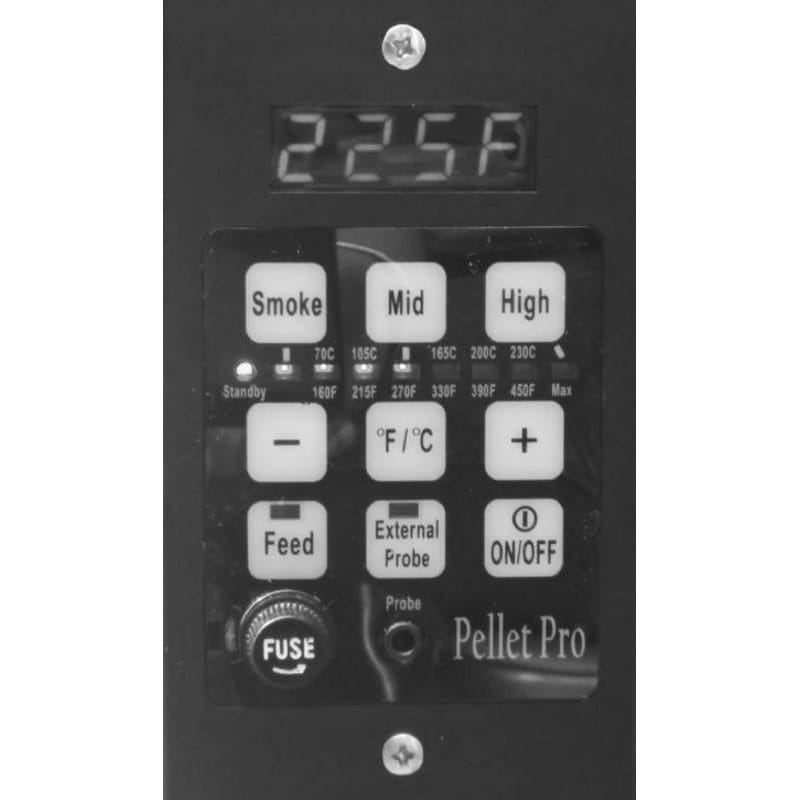
Credit: smokedaddyinc.com
Why Reset Your Pellet Grill Controller
Your pellet grill controller manages the temperature and cooking process. Sometimes, it may stop working correctly.
Resetting the controller can fix errors and help your grill work like new again.
Common Issues Requiring A Reset
Some problems happen often and need a reset to fix them. These include frozen screens and wrong temperature readings.
- Controller screen freezes or becomes unresponsive
- Temperature does not match the set value
- Pellet feed stops working or feeds irregularly
- Error codes that do not clear
- Grill fails to start heating
Benefits Of Resetting The Controller
Resetting the controller can solve many issues quickly. It restores the controller to its original settings.
This process helps your grill run smoothly and prevents bigger problems later.
- Clears error messages and glitches
- Restores accurate temperature control
- Improves pellet feeding function
- Enhances grill performance and reliability
- Extends the life of your pellet grill
Tools Needed For Reset
Resetting a pellet grill controller needs the right tools. Using proper equipment makes the process simple and safe.
This guide shows which tools you need before you start resetting your pellet grill controller.
Essential Equipment
You need some basic tools to reset your pellet grill controller. These tools help you access the controller and perform the reset safely.
- Phillips screwdriver to open the control panel
- Flathead screwdriver for prying open covers
- Multimeter to check electrical connections
- Soft cloth to clean the controller screen
- Replacement batteries if your controller uses them
- Owner’s manual for specific reset instructions
Safety Precautions
Safety is important when working with a pellet grill controller. Follow these tips to avoid injury or damage.
- Turn off and unplug the pellet grill before resetting
- Wear gloves to protect your hands
- Keep the work area dry and clean
- Use insulated tools to prevent electric shock
- Follow the manual’s safety warnings
- Do not force parts open to avoid breaking them
Step-by-step Reset Process
Resetting your pellet grill controller can fix many common issues. Follow these steps carefully to reset the controller safely.
This guide breaks down the reset process into easy parts. Each section helps you complete the reset without trouble.
Powering Down The Grill
Start by turning off the grill to ensure safety. This stops all functions and prepares the controller for reset.
- Locate the power switch on the grill.
- Turn the switch to the “off” position.
- Unplug the grill from the electrical outlet.
- Wait at least five minutes before proceeding.
Accessing The Controller
You need to find and open the controller panel. This lets you reach the reset button or access the settings menu.
The controller is usually behind a small door or panel near the display screen.
- Open the controller panel carefully.
- Identify the reset button or the control dial.
- If needed, check the user manual for exact location.
Performing The Reset
Press the reset button or follow the control menu to reset the system. This clears any errors and restarts the controller’s software.
- Press and hold the reset button for 10 seconds.
- Release the button once the display turns off.
- If using the menu, navigate to “Reset” and confirm.
- Wait for the controller to complete the reset process.
Restarting The Grill
After reset, power the grill back on. Check that the controller works normally and the grill heats correctly.
| Action | What to Expect |
|---|---|
| Plug in the grill | The controller display lights up |
| Turn on the power switch | The grill starts heating as usual |
| Set desired temperature | The grill maintains the set temperature steadily |

Credit: ddrbbqsupply.com
Troubleshooting After Reset
Resetting your pellet grill controller can fix many common problems. Sometimes, issues continue even after the reset.
Knowing what to check next helps you get your grill working again. This guide covers common issues and when to seek help.
Common Post-reset Issues
After a reset, you might see errors or performance problems. Here are some frequent issues and quick fixes.
- Controller Does Not Power On:Check the power source and connections.
- Temperature Fluctuations:Ensure the temperature probe is clean and properly connected.
- Auger Not Feeding Pellets:Clear pellet jams or check the auger motor.
- Display Shows Error Codes:Refer to the user manual for specific code meanings.
- Fan Not Running:Inspect the fan wiring and motor for damage.
When To Contact Support
If the problems stay after basic checks, contact the grill manufacturer’s support team. They can help with complex issues.
| Issue | Reason to Contact Support |
| Controller Won’t Reset | Possible hardware failure or firmware bug |
| Persistent Error Codes | Errors not explained in the manual |
| No Heat or Smoke | Potential electrical or mechanical failure |
| Unresponsive Controls | Touchscreen or button malfunction |
| Repeated Resets Needed | Underlying issue affecting controller stability |
Maintaining Your Pellet Grill Controller
Keeping your pellet grill controller in good shape helps it work well. Regular care can prevent problems and extend its life.
This guide explains how to clean and update your pellet grill controller for best results.
Regular Cleaning Tips
Clean the controller regularly to avoid dirt and grease buildup. This keeps the controls responsive and easy to read.
Use a soft, dry cloth to wipe the surface. Avoid using water or harsh cleaners that can damage the electronics.
- Turn off and unplug the grill before cleaning
- Use a microfiber cloth to gently remove dust
- Clean around buttons and screen carefully
- Do not spray liquids directly on the controller
- Check for any loose connections or damage
Firmware Updates
Updating the firmware keeps your pellet grill controller working with the latest features and fixes. Check the manufacturer’s website for updates.
Follow the instructions carefully to install updates. This can improve the grill’s performance and add new functions.
- Connect the controller to a computer or Wi-Fi if needed
- Download the correct firmware version for your model
- Follow update steps exactly to avoid errors
- Do not turn off the grill during the update
- Restart the controller after updating

Credit: ddrbbqsupply.com
Frequently Asked Questions
How Do I Reset My Pellet Grill Controller?
To reset your pellet grill controller, start by unplugging it from the power source. Wait for about 30 seconds before plugging it back in. This simple process can resolve minor glitches and restore the controller’s default settings, helping your grill function smoothly.
Why Isn’t My Pellet Grill Turning On?
If your pellet grill won’t turn on, check the power source first. Ensure the grill is properly plugged in and the outlet is functioning. Inspect the power cord for any damage. Resetting the controller might also help resolve this issue effectively.
Can I Reset A Pellet Grill Without Unplugging It?
Most pellet grills require unplugging to reset the controller effectively. This method ensures the controller’s settings are fully restored to default. If your grill has a reset button, refer to the user manual for specific instructions. Always follow manufacturer guidelines for best results.
What If Resetting Doesn’t Fix My Pellet Grill?
If resetting doesn’t solve the issue, inspect other components like the fuse and igniter. Ensure there are no blockages in the pellet hopper. Consulting your grill’s manual or reaching out to customer support might provide additional troubleshooting steps or solutions.
Conclusion
Resetting your pellet grill controller can fix many common issues. Follow the simple steps carefully to avoid mistakes. A quick reset often restores proper function. Keep your grill clean and well-maintained to prevent problems. Always check the manual for model-specific advice.
Taking these small actions helps your grill work better and longer. Enjoy cooking with confidence, knowing your grill responds well. A reset is easy and saves time on repairs. Try it next time your grill acts up.