
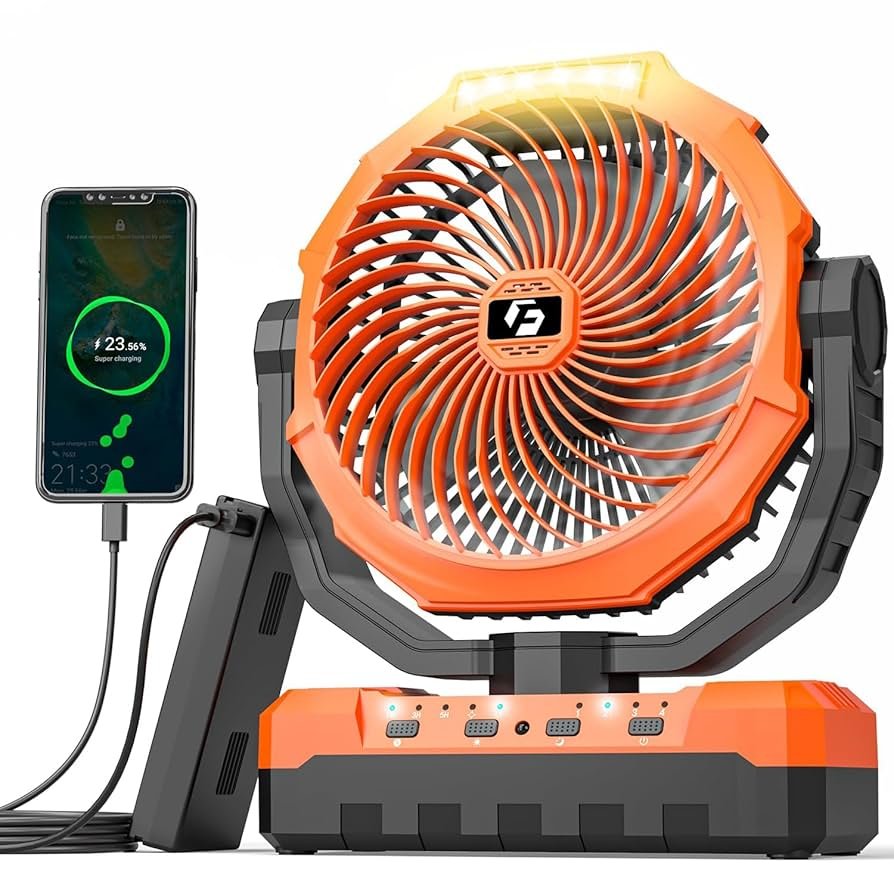
Imagine you’re all set for a perfect barbecue day. The sun is shining, the grill is hot, and your favorite people are gathered around.
But suddenly, your portable BBQ fan runs out of juice. Panic not! Knowing how to recharge your portable BBQ fan can save your day and keep the good times rolling. In this guide, you’ll discover simple steps to power up your fan and ensure your BBQ experience stays sizzling.
Stay tuned, because mastering this skill will make you the hero of every backyard gathering. Ready to dive in? Let’s get your grill fan back in action!
Types Of Portable Bbq Fans
Portable BBQ fans come in two main types: manualand electric. Manual fans need you to move them by hand to create airflow. They are simple and do not require batteries or charging. Electric fans run on power and offer continuous airflow without effort.
Battery-powered fans are a popular electric option. They use rechargeable or replaceable batteries. This makes them easy to carry and use anywhere. Battery life varies by model, so check how long the fan runs before recharging.
| Type | Power Source | Pros | Cons |
|---|---|---|---|
| Manual Fan | Hand-powered | Lightweight, no charging needed | Requires constant effort |
| Electric Fan | Battery or USB | Hands-free, steady airflow | Needs charging or batteries |
Tools And Materials Needed
Charging cables and adaptersmust match your portable BBQ fan’s port type. Common types include USB-C, Micro-USB,or proprietary connectors. Using the wrong cable can cause slow charging or damage. Always check the fan’s manual for the recommended cable.
Different power sourcescan be used for charging. A USB wall adapteris the most common and provides stable power. Portable power banks offer charging on the go. A laptop USB port can also work but may charge slower.
- Use the correct cable for your fan
- Choose a power source with enough output (at least 5V/1A)
- Avoid charging from low-power sources like phone chargers below 1A
- Check fan’s charging indicator to know when fully charged
Preparation Before Charging
Before charging, check the battery levelof your portable BBQ fan. Most fans have a small indicator light or screen to show the current charge. Ensure the battery is not fully drained or overcharged for best performance.
Cleaning fan parts is important for smooth operation. Use a soft cloth to remove dust from the fan bladesand casing. Avoid water inside the battery compartment to prevent damage.
Credit: www.temu.com
Step-by-step Charging Process
Connect the portable BBQ fan to a power source using the included USB cable. Make sure the cable fits securely into the fan’s charging port. Use a USB adapter or a power bank to provide power. Avoid using damaged cables or adapters to prevent issues.
Keep the fan on a flat surface during charging. This helps prevent damage and ensures proper charging.
- Check the fan’s LED indicator light to monitor charging.
- A red light usually means charging is in progress.
- A green or blue light shows the fan is fully charged.
- Charging time varies by model but is often between 2-4 hours.
- Unplug the fan once fully charged to save battery life.
Safety Tips During Charging
Avoid overchargingby unplugging the fan once fully charged. Leaving it plugged in too long can damage the battery and reduce its life. Use a timer or set an alarm to remind you to disconnect the charger.
Check the fan’s manual for the recommended charging time. Overcharging wastes energy and might cause overheating. Never leave the fan charging unattended.
- Use only the charger that came with the fan or one recommended by the maker.
- Inspect cables and plugs for damage before use.
- Keep charging ports dry and clean to avoid short circuits.
- Charge in a cool, dry place away from flammable materials.
Troubleshooting Charging Issues
Fan Not Chargingcan happen due to several reasons. Check if the charging cableis properly connected to both the fan and the power source. Inspect the cable and charger for any visible damage. Sometimes, the fan’s batterymay be completely drained, requiring a longer charging time. Make sure the power outlet is working by testing it with another device. Clean the fan’s charging port carefully to remove any dust or debristhat might block the connection.
Slow Charging Problemsoften occur when using a low-power charger. Use the charger that came with the fan or one with the same power rating. Charging through a computer USB port can be slower than a wall adapter. Avoid using damaged or very long cables, as they reduce power flow. Keep the fan in a cool place while charging; heat can slow down battery charging. Charging may also be slower if the battery is old and worn out.
Maintaining Battery Health
Store the portable BBQ fan in a cool, dry place. Avoid places with direct sunlight or heat. High temperatures can harm the battery life. Keep the fan away from moisture to prevent damage. Remove the battery if you do not plan to use the fan for a long time.
Charge the fan regularly, even if it is not used. Do not let the battery drain completely before charging. Partial charging helps keep the battery healthy. Use the charger that came with the fan to avoid damage. Avoid overcharging by unplugging once fully charged.

Credit: www.amazon.ca
Credit: www.amazon.com
Frequently Asked Questions
How Do I Recharge A Portable Bbq Fan?
To recharge a portable BBQ fan, connect it to a USB power source using the provided cable. Ensure the fan’s charging indicator is on. Charging typically takes 1-3 hours depending on the battery capacity and charger used.
Can I Use Any Charger For Portable Bbq Fans?
It is best to use the charger provided by the manufacturer. Using chargers with incorrect voltage or current can damage the fan’s battery or reduce its lifespan. Always check the fan’s manual for recommended charging specifications.
How Long Does A Portable Bbq Fan Last After Charging?
Most portable BBQ fans last between 2 to 6 hours on a full charge. The exact runtime depends on the fan speed and battery capacity. Lower speeds generally extend battery life, while higher speeds consume more power quickly.
What Should I Do If My Bbq Fan Won’t Recharge?
If your BBQ fan won’t recharge, check the charging cable and port for damage or debris. Ensure the power source works. If problems persist, the battery may need replacement or professional repair.
Conclusion
Recharging your portable BBQ fan is simple and saves time. Use the right charger and follow instructions carefully. Keep your fan clean and dry before charging. Regular charging helps the fan last longer. Don’t let your fan run out during grilling.
A charged fan keeps air moving and smoke away. Enjoy your BBQ with fresh air and less heat. Remember, small care steps improve your fan’s performance. Stay ready for every BBQ session with a fully charged fan.