
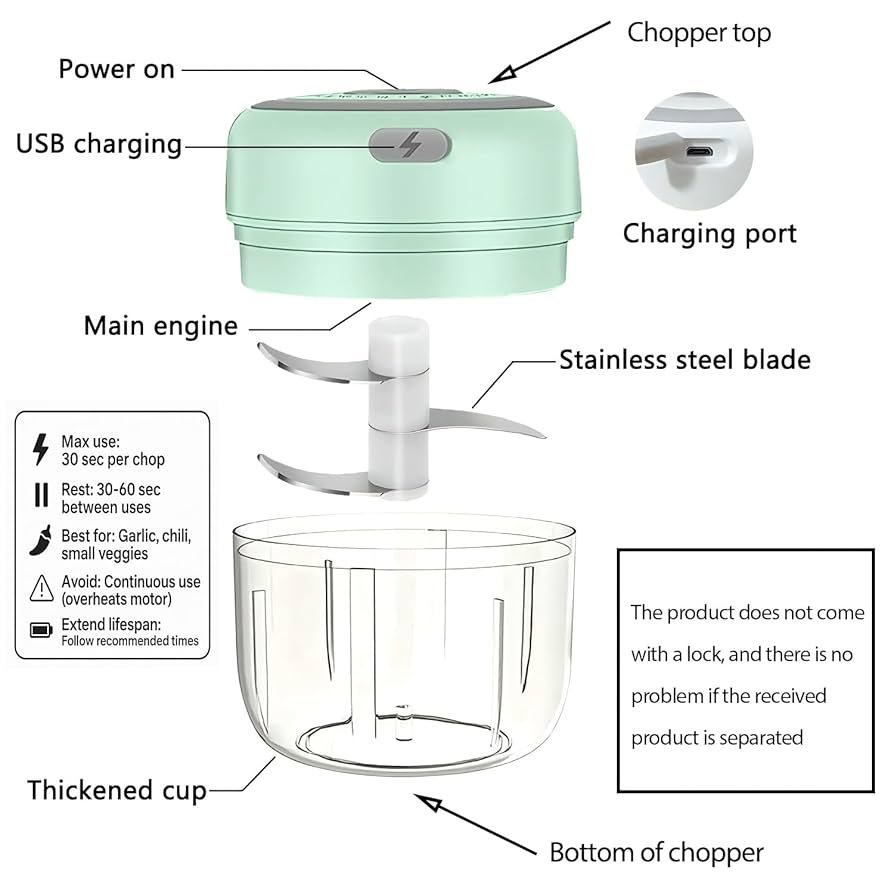
Have you ever noticed your mini food processor getting hot and stopping right when you need it most? It’s frustrating and can even damage your appliance over time.
But what if you could keep your processor running smoothly without worrying about it overheating? You’ll discover simple, effective tips to protect your mini food processor and make sure it works like new every time you use it. Keep reading—you’ll save time, avoid costly repairs, and enjoy hassle-free meal prep.

Credit: www.amazon.com
Causes Of Overheating
Motor strainhappens when the food processor works too hard. It tries to chop tough or large pieces. This makes the motor hot and tired quickly. Using the right size and type of food can help reduce strain.
Inadequate ventilationblocks the airflow needed to cool the motor. Placing the processor in a tight space or covering vents causes heat to build up. Always keep the vents clear and place the processor on a flat, open surface.
Prolonged usagemeans running the processor for too long without breaks. This causes heat to rise and parts to wear out faster. Short bursts of use with rest periods can protect the machine.
Electrical issueslike power surges or faulty wiring can cause overheating. Check the power cord and plug for damage. Using the correct voltage and a stable power source keeps the processor safe.

Credit: www.vevor.com
Safe Operating Practices
Mini food processors can get hot. It’s important to let them cool down. After using for a few minutes, pause. Let the machine rest for a while. This prevents overheating. It keeps the processor safe.
Overloading the processor is risky. It can make the motor hot. Use small amounts of food each time. This helps the processor work better. It also lasts longer this way.
Different foods need different speeds. Use the recommended settings for each food type. Follow the manual for guidance. This ensures the processor works efficiently. It keeps the motor from getting too hot.
Maintenance Tips
Cleaning vents and bladeshelps stop overheating. Dust and food bits block air flow. Use a soft brush or cloth to clear vents. Remove blades carefully and wash with warm, soapy water. Dry all parts before putting them back. This keeps the motor cool and blades sharp.
Checking power cordsis key for safety and performance. Look for cuts, cracks, or bare wires. A damaged cord can cause short circuits or stop the processor from working. Replace any worn cords right away. Keep cords away from water and heat sources.
Lubricating moving partsreduces friction and heat. Use a small amount of food-safe lubricant on the motor shaft and blade base. Avoid over-lubricating as this can attract dirt. Regular lubrication helps the parts move smoothly and last longer.
Choosing The Right Processor
Motor poweraffects how well a mini food processor works. A motor with at least 200 watts handles most tasks without strain. Too low power may cause the motor to overheat quickly.
Size and capacitymatter for your cooking needs. Choose a size that fits the amount of food you usually prepare. Smaller bowls may overload the motor if filled too much.
Brand reliabilityshows the quality and durability of the processor. Trusted brands often use better parts that resist overheating. Check reviews to find brands known for lasting performance.
Troubleshooting Overheating
The thermal fuse helps stop the mini food processor from overheating. Resetting it can fix some problems. First, unplug the device. Then open the base to find the fuse. Press the reset button or replace the fuse if needed. Use a small tool carefully to avoid damage.
Faulty parts cause overheating too. Check the motor, blades, and wiring for damage. Look for burnt smells or broken wires. Clean any stuck food bits that block the blades. Damaged parts need replacement to keep the processor safe.
Professional repair is best when problems persist. Overheating can harm the motor or electrical parts. Experts have tools and knowledge to fix these issues safely. Avoid using the device until it is fully checked and repaired.

Credit: www.amazon.co.uk
Frequently Asked Questions
How Can I Stop My Mini Food Processor From Overheating?
To prevent overheating, avoid running the processor continuously for long periods. Use short pulses and allow it to cool between uses.
Why Does My Mini Food Processor Get Hot Quickly?
Overheating occurs from prolonged use or overloading. Ensure you don’t process too much at once and give breaks between uses.
What Maintenance Helps Avoid Mini Food Processor Overheating?
Regularly clean the motor vents and blades. Keeping parts free from debris improves airflow and prevents excessive heat buildup.
Can Overloading Cause A Mini Food Processor To Overheat?
Yes, overloading strains the motor and causes overheating. Always follow the recommended capacity limits for your processor model.
Conclusion
Preventing your mini food processor from overheating keeps it working longer. Always give it breaks during use. Avoid overloading the bowl with too much food. Keep the blades clean and sharp for smooth operation. Use the processor only for its intended tasks.
Watch the motor’s temperature as you work. Taking these steps protects your appliance and saves money. Enjoy hassle-free food prep with a cooler, safer processor. Small habits make a big difference in performance. Stay mindful and your mini food processor will serve you well.