
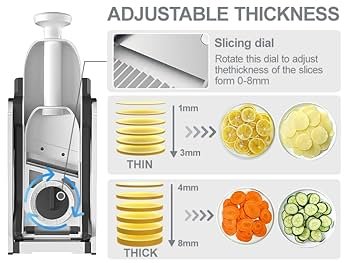
Are you struggling to get the perfect slice every time with your compact slicer? Whether you want paper-thin cuts or thicker, heartier pieces, knowing how to adjust the thickness on your slicer makes all the difference.
Imagine slicing your favorite meats, cheeses, or vegetables just the way you like them—quickly and effortlessly. In this guide, you’ll discover simple steps to master your slicer’s thickness settings. Keep reading, and you’ll unlock the secret to perfect slices that will elevate your meals and save you time in the kitchen.
Choosing The Right Thickness
Adjust the thickness by turning the dial or knob on the compact slicer. Test slices to find the size that suits your needs best. Small changes can make a big difference in texture and presentation.
Factors Affecting Slice Thickness
The type of food affects the slice thickness. Soft foods need thinner slices to avoid crushing. Hard foods can handle thicker slices without breaking. The desired texture plays a big role too. Thicker slices give a chewy feel, while thin slices are crispier. The machine’s settings limit how thin or thick slices can be. Always check the slicer’s manual for best practices. Safety is important; thicker slices reduce the chance of accidents. Adjust the slicer carefully to match the food and recipe.
Ideal Thickness For Different Foods
| Food Type | Ideal Thickness | Reason |
|---|---|---|
| Cheese | 1-2 mm | Thin slices melt easily and taste better |
| Meat | 2-4 mm | Thicker slices hold juices and texture |
| Vegetables | 1-3 mm | Thin slices cook faster and evenly |
| Bread | 5-10 mm | Thicker slices prevent crumbling |
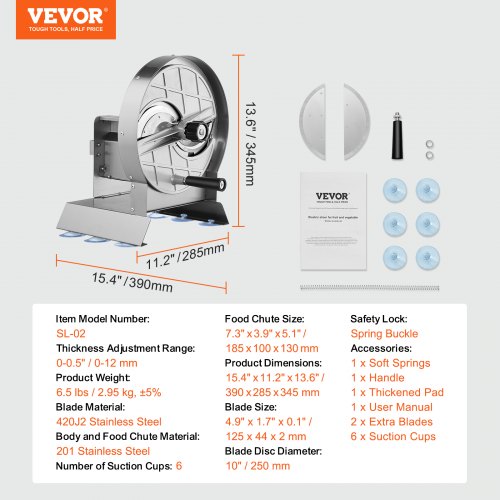
Credit: www.vevor.ca
Locating Thickness Adjustment Controls
Finding the thickness adjustment on a compact slicer is simple. These slicers often have two types of controls. Some use manual adjustment knobs, while others have digital settings and displays. Each type has its own way of adjusting thickness.
Manual Adjustment Knobs
Manual knobs are easy to spot. They are usually round and located near the blade. Turning the knob clockwise makes slices thinner. Turning it counter-clockwise makes slices thicker. Adjust the knob slowly to get the right thickness.
Digital Settings And Displays
Some slicers have digital displays. These show the current thickness setting. Use buttons to change the thickness. Look for a digital panel on the slicer. Press the “+” button for thicker slices. Press the “-” button for thinner slices. Digital settings offer precise control.
Step-by-step Thickness Adjustment
Make sure the slicer is clean and unplugged before starting. Place it on a flat surface for safety. Check that the blade is sharp and properly fixed. Remove any food scraps from earlier use.
Locate the thickness adjustment knob or lever. Turn or slide it slowly to set the desired slice thickness. Smaller numbers or settings mean thinner slices. Larger numbers mean thicker slices. Adjust in small steps to avoid mistakes.
Plug in the slicer and turn it on. Place a piece of food on the slicer tray. Push the food gently towards the blade and make a slice. Check the slice thickness. Repeat adjusting if needed until the slices are just right.
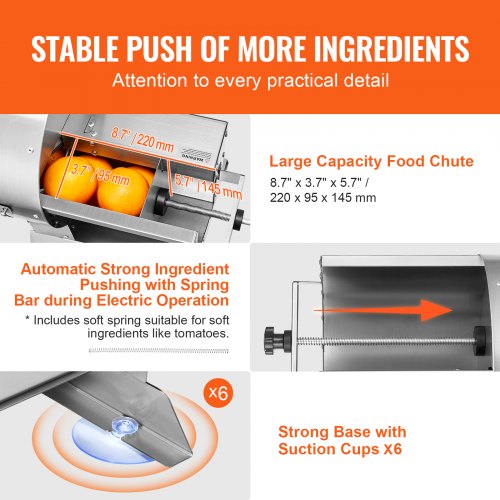
Credit: www.vevor.ca
Tips For Consistent Slices
Blade sharpnessis key for smooth and even slices. Check blades often and replace them if dull. A sharp blade cuts easily and safely.
Place food flat and steady on the slicer. This keeps slices uniformand avoids slipping. Small or round items may need a firm grip or holder.
- Use guides or attachments to keep thickness steady.
- Adjust the thickness knob slowly for fine control.
- Secure attachments tightly to avoid movement.
Common Mistakes To Avoid
Over-tightening adjustment knobscan cause damage to the slicer. It may make the blade hard to move or break the parts. Always turn knobs gently to avoid problems.
Ignoring safety precautionsis risky. The blade is very sharp. Keep hands away while adjusting. Use safety gloves if needed. Never force the slicer when it feels stuck.
Skipping regular maintenancecan make the slicer less effective. Clean the blade and parts after use. Check for loose screws and tighten them. Regular care helps the slicer last longer and work better.
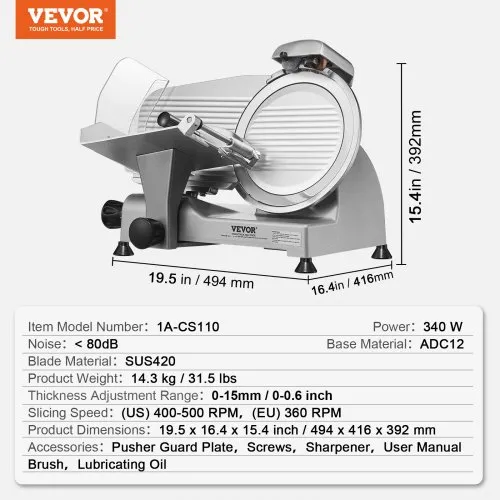
Credit: www.vevor.ca
Troubleshooting Thickness Issues
Uneven slices often happen due to blade dullnessor incorrect thickness settings. Check the blade for any damage or dirt. Clean and sharpen if needed. Make sure the thickness knob is set to the right position and turns smoothly.
If the adjustment mechanism is not responding, the slicer might be jammed. Remove food pieces blocking the gear or knob. Lubricate moving parts lightly to help smooth movement. Avoid forcing the knob to prevent damage.
Blade alignment problemscause uneven or unsafe slicing. Ensure the blade is seated firmly and straight. Tighten any loose screws or bolts around the blade. Misalignment can lead to uneven cuts and possible injury.
Frequently Asked Questions
How Do I Change The Blade Thickness On A Compact Slicer?
To adjust blade thickness, locate the thickness control knob or lever. Turn or slide it to the desired thickness. Always ensure the slicer is off before adjusting to avoid accidents. Test slice thickness with a small cut before full use.
Can I Adjust Thickness Without Tools On A Compact Slicer?
Yes, most compact slicers have a built-in thickness adjustment knob. This allows tool-free, easy changes. Simply rotate the knob until you reach your preferred slice thickness. Always make adjustments when the slicer is powered off for safety.
What Is The Ideal Slice Thickness For A Compact Slicer?
Ideal thickness depends on your food type and recipe. For meats, 1-3 mm is common. For vegetables or cheese, slices can be thicker. Always start thin and adjust based on your preference and dish requirements.
How Often Should I Check The Slicer’s Thickness Setting?
Check the thickness setting before every use to ensure accuracy. Adjustments may shift during transport or cleaning. Regular checks prevent uneven slicing and improve food presentation.
Conclusion
Adjusting the thickness on your compact slicer is simple and quick. Small changes can make a big difference in your slicing results. Always set the thickness before you start slicing for best results. Regular practice helps you get comfortable with the adjustments.
This way, you enjoy perfectly sliced food every time. Keep your slicer clean and safe to use it longer. Try different thickness settings to find what suits you best. Slicing becomes easier and more precise with each use. Enjoy your meals with the perfect slice!