
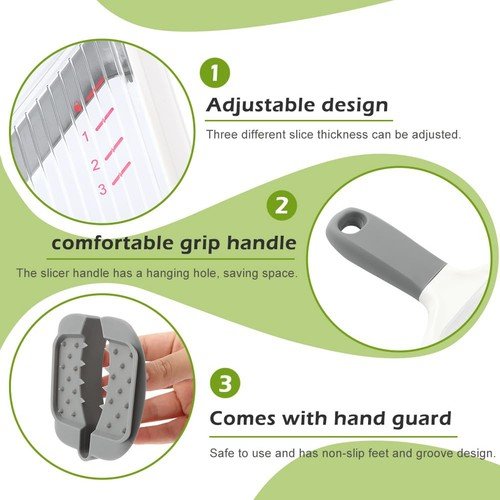
Are you tired of uneven slices ruining your meals or recipes? Knowing how to adjust slicing thickness can change everything—from perfectly layered sandwiches to beautifully cooked vegetables.
Whether you’re using a kitchen slicer or a food processor, getting the thickness just right saves time, improves texture, and elevates your cooking. You’ll discover simple, practical tips that make adjusting slicing thickness easy and precise. Keep reading to unlock the secret to slicing like a pro every time.
Choosing The Right Thickness
Choosing the right slicing thicknessdepends on what you want to do with the slices. Thinner slices cook faster and are good for delicate foods. Thicker slices keep more moisture and texture. Different recipes need different thickness levels.
Factors influencing slice thicknessinclude the type of food, cooking method, and personal taste. Soft foods need thinner slices to cook evenly. Hard foods can be sliced thicker to keep their shape. Cooking time also changes with thickness.
| Common Thickness Setting | Use |
|---|---|
| Thin (1-2 mm) | Salads, sandwiches, fast cooking |
| Medium (3-5 mm) | Soups, stews, general cooking |
| Thick (6-10 mm) | Grilling, roasting, slow cooking |
Adjusting Manual Slicers
The thickness diallets you set how thick or thin slices will be. Turn the dial gently to change the slice size. Smaller numbers mean thinner slices. Larger numbers give thicker slices. Make small adjustments to get the exact thickness you want.
Check the dial before you start slicing. Make sure it is locked in place to avoid changing thickness mid-use. Clean the dial area to keep it working smoothly.
- Keep the food steady while slicing for even cuts.
- Use a smooth motion to avoid jagged edges.
- Check slice thickness often to stay consistent.
- Clean slicer parts after use to maintain performance.
Setting Electric Slicers
Adjust the slicing thickness by turning the dial or knob on the electric slicer. Test the setting with a small piece of food to get the desired thickness. Always ensure the slicer is off before making adjustments for safety.
Digital Controls Explained
Electric slicers have digital buttons. These control the slicing thickness. Each button changes the thickness setting. Some slicers show numbers on a screen. Others use lights to show the thickness. Understanding these controls helps get the right slice every time. Always check the manual for specific instructions. This helps avoid mistakes.Calibrating For Precision
Calibration ensures slices are exact. First, clean the slicer well. Dust can affect precision. Next, set the slicer to zero. This makes sure the base is flat. Adjust the thickness slowly. Use a test piece to check the slice. Adjust again if needed. Precision slicing requires practice. Keep trying to get better. `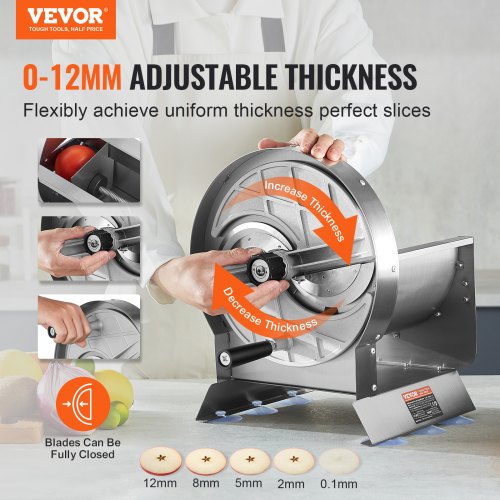
Credit: www.vevor.ca
Slicing Different Foods
Adjust slicing thicknessbased on the type of food for best results. For meat slicing, thinner slices work well for dishes like sandwiches and salads. Thicker cuts suit roasts or steaks. Use a sharp knife and steady pressure to avoid tearing.
Cheese slicingdepends on the cheese type. Soft cheese needs thin, gentle slices to keep shape. Hard cheese can be cut thicker without crumbling. A cheese wire or a special slicer helps achieve even cuts.
Bread slicingrequires a serrated knife. Slicing bread too thick makes it hard to eat; too thin, and it falls apart. Aim for medium thickness for sandwiches or toast. Use a gentle back-and-forth motion to keep slices neat.
Maintaining Your Slicer
Adjust the slicer blade carefully to set the thickness you want. Tighten screws securely to keep the setting stable during use. Regular checks ensure even slices every time.
Blade Sharpening Guide
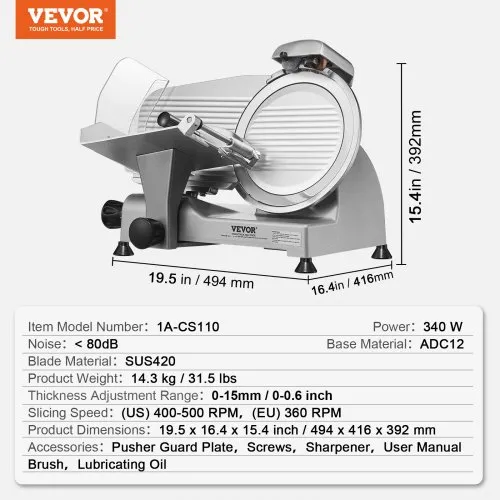
Keep the blade sharp for smooth, even slices. Use a sharpening stone or tool made for slicers. Hold the blade steady. Move the sharpener along the blade edge slowly and evenly. Repeat a few times on each side. Test the blade on a small piece of food. A sharp blade cuts easily and cleanly. Dull blades can tear or crush food. Sharpen the blade regularly to keep it working well.
Cleaning And Safety Tips
- Unplug the slicer before cleaning.
- Use a soft cloth and warm soapy water.
- Wipe the blade carefully to avoid cuts.
- Dry all parts completely before reassembling.
- Keep the slicer in a safe place out of reach of children.
- Wear cut-resistant gloves for extra safety.
- Clean after every use to stop germs and food buildup.
Credit: www.vevor.ca
Troubleshooting Common Issues
Uneven slices often happen because the blade is dull or dirty. Make sure the blade is clean and sharp. Check if the food is placed straight on the slicer. Hold the food firmly to avoid slipping. Adjust the thickness knob to a smaller setting for thinner slices. For thicker slices, increase the setting slowly.
Tough foods need extra care. Use a slower slicing speed to keep slices even. Apply steady pressure without forcing the food through. Cutting frozen or very hard foods may damage the slicer. Let tough food thaw a little before slicing.

Credit: www.amazon.com
Frequently Asked Questions
How Do I Change Slicing Thickness On A 3d Printer?
To adjust slicing thickness, open your slicer software and locate layer height settings. Decrease the value for thinner layers, or increase it for thicker ones. This controls print resolution and speed. Always save changes before starting the print.
What Is The Ideal Slicing Thickness For Detailed Prints?
For detailed prints, use a slicing thickness between 0. 1mm and 0. 2mm. Thinner layers produce smoother surfaces but take longer. Choose based on your printer’s capability and desired quality for best results.
Can Slicing Thickness Affect Print Strength?
Yes, slicing thickness impacts print strength. Thicker layers bond better, enhancing durability. However, very thick layers may reduce detail quality. Balance thickness to ensure strength without compromising print resolution.
How Does Slicing Thickness Influence Print Speed?
Thicker slicing layers reduce the number of layers, speeding up print time. Conversely, thinner layers increase print duration due to more layers. Adjust thickness based on your priority: speed or detail quality.
Conclusion
Adjusting slicing thickness helps improve food texture and cooking time. Thin slices cook faster and suit salads or sandwiches. Thicker slices keep food juicy and work well for grilling or roasting. Always check your slicer settings before starting. Small changes make a big difference in your meals.
Practice a few times to find your favorite thickness. Enjoy better meals with simple slicing tips. Keep experimenting and see what works best for you.