
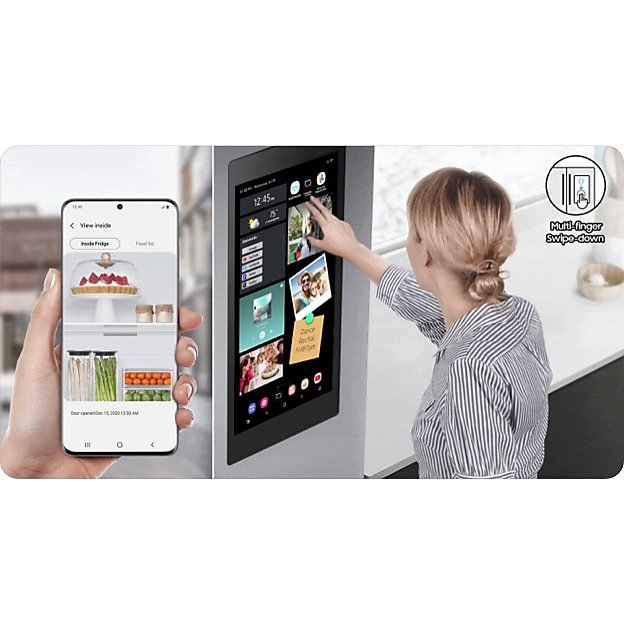
Imagine walking into your kitchen, feeling the cool breeze from your smart fridge, and knowing that it’s seamlessly connected to your entire smart home. This isn’t just a futuristic fantasy; it’s a reality you can achieve today.
Integrating a smart fridge with your smart home setup can not only make your daily routines smoother but also save you time and energy. Think about it: your fridge automatically updating your grocery list, suggesting recipes based on the food you have, and even adjusting its temperature for energy efficiency, all while communicating effortlessly with your other smart devices.
If you’re curious about transforming your kitchen into a high-tech hub, this guide will show you how to make your smart fridge a key player in your smart home ecosystem. Get ready to discover tips and tricks that will make you wonder how you ever lived without this level of convenience.
Choosing The Right Smart Fridge
Picking a smart fridge can be fun. Look for energy-saving features. They help save on bills. Check the storage space. Make sure it fits your needs. Touchscreen displays are cool. They let you see inside without opening the door.
Your fridge should work with your home system. Check if it connects with Alexa or Google Home. This makes controlling it easy. Wi-Fi is important too. It lets your fridge talk to other devices. This can help with grocery lists. Choose one that fits your smart home setup.
Setting Up Your Smart Fridge
Open the box carefully. Remove all parts from the package. Place the fridge where you want it. Make sure it fits nicely. Use the instructions for setup. Follow each step clearly. Plug in the power cord. Check if the lights turn on. Ensure all shelves are in place. Arrange them as per your need. Check if the doors close well. Adjust the temperature settings. Make sure it matches your food needs.
Find the Wi-Fi option on the fridge screen. Select it to start. Enter your Wi-Fi name. Type the password correctly. Make sure it connects. Check the signal strength. It should be strong. Open the app on your phone. Pair your fridge with the app. Follow the steps shown. Complete the setup process.
Integrating With Smart Home Hub
Smart fridges connect with various hubs and platforms. Popular hubs include Amazon Echo, Google Home, and Apple HomeKit. Check compatibility before purchasing a smart fridge. Not all fridges work with every hub. Compatibility ensures smooth integration. Read device manuals for specific information. Look for compatibility labels on packaging. Shop for fridges that list compatible hubs. Use online resources for detailed compatibility lists. Ask experts for advice on smart fridge choices. Compatibility is key for a connected home.
First, connect your fridge to Wi-Fi. Use the fridge’s app on your phone. Follow app instructions to connect. Next, open your hub’s app. Find the option to add a device. Select your fridge from the list. Enter any required codes. Follow prompts to finish the setup. Test the connection by sending a command. Ensure the fridge responds. Repeat steps if the connection fails. Contact support if needed. A stable connection enhances your smart home experience.
:max_bytes(150000):strip_icc()/smart-home.asp-final-5de0da3d6d8a474f9028d26c957255fe.png)
Credit: www.investopedia.com
Using Voice Assistants
Connect your smart fridge to Alexa or Google Assistant. Start by opening the app on your phone. Find the settings menu and select devices. Add your fridge by tapping add device. Follow the on-screen instructions to finish. Your fridge is now ready to follow your voice commands.
Use simple words to control your fridge. Say “Hey Google, open the fridge”. Or try “Alexa, set fridge temperature to 4 degrees”. You can ask “What’s inside my fridge?”. It’s easy to manage with just your voice.
Managing Fridge Settings Remotely
Smart fridges can be controlled with a mobile app. The app lets you change temperature easily. You can set it cooler or warmer. Notifications help you know if the door is open. They also tell you if the power goes out. Adjusting these settings is simple. Just open the app and tap the options. You can see real-time updates. This means you know what’s happening inside your fridge. You can save food longer with the right temperature. It’s easy to manage settings from anywhere. This feature makes life more convenient.
Enhancing Home Automation
Smart fridges can make life easier. Imagine waking up and coffee is ready. You can create routines with your smart fridge. Set it to start your coffee maker in the morning. It can also turn off lights when everyone leaves. This makes your home smarter. Scenes can be set for dinner time. The fridge can notify you if food is running low. It’s like having a helper at home.
Smart fridges work well with other devices. They can connect with smart speakers. You can ask about your grocery list. They also sync with your phone. This lets you know what’s inside without opening the door. Thermostats can adjust the temperature based on fridge data. This saves energy. It’s a team effort to make your home smart.
Troubleshooting Common Issues
Smart fridges may not connect to your home network. First, check the Wi-Fi settings on your fridge. Make sure your fridge is within range of the router. Walls and doors can block signals. Try restarting your router and fridge. This can fix many connection problems. Consider updating your router’s firmware. New updates can improve connectivity. If problems persist, contact your fridge’s support team.
Keep your smart fridge apps up to date. Updates fix bugs and improve features. Check your phone’s app store for updates. Install new versions right away. Also, update your fridge’s software. Look in settings for update options. Updates can solve many issues. Some updates happen automatically. Set your fridge to auto-update if possible.
Credit: www.reddit.com
Future-proofing Your Smart Home
Smart fridges bring exciting features to homes. They connect to the internet. This helps them get updates. New features make them more useful. For example, they can suggest recipes. They can remind you of food to buy. It’s important to keep them updated. Updates make sure they work well. Regular updates ensure security. They help avoid any problems. Stay informed about updates. Check for updates often. Use apps to manage updates easily.
Many devices are now part of the Internet of Things (IoT). Smart fridges are part of this trend. They can communicate with other devices. They help create a connected home. IoT advancements make homes smarter. They improve the way devices talk to each other. Prepare for changes in technology. Understand how your fridge fits in IoT. Learn about new IoT features. Stay prepared for future tech updates. These advancements make homes efficient.

Credit: www.sciencedirect.com
Frequently Asked Questions
How Do I Connect My Fridge To Smartthings?
To connect your fridge to SmartThings, download the SmartThings app. Follow the app’s instructions to add your device. Ensure your fridge is compatible and connected to Wi-Fi. Once added, manage your fridge settings through the app for seamless smart control.
Which Apps To Be Downloaded For A Smart Refrigerator?
Download apps like SmartThings, LG ThinQ, and Samsung Family Hub for smart refrigerator features and control. These apps enhance connectivity, offer remote management, and provide food management tools. Check your refrigerator brand for specific app compatibility and recommendations.
How To Connect Fridge To Wi-fi?
Begin by accessing your fridge’s settings menu. Select “Wi-Fi” and enter your network details. Confirm the connection to complete the process. Ensure your router is within range for a stable connection. Check the manufacturer’s manual for specific instructions tailored to your fridge model.
What Operating System Do Smart Fridges Use?
Smart fridges typically use operating systems like Android, Linux, or custom OS developed by manufacturers. These systems enable connectivity, app integration, and smart features. Samsung fridges often use Tizen, while LG fridges might use WebOS. The choice of OS depends on the brand and model.
Conclusion
Integrating a smart fridge into your smart home is easy. Start with a compatible fridge. Use the right app for connection. Ensure Wi-Fi stability for smooth operation. Explore features like grocery tracking and energy management. Enjoy more convenience and efficiency in your daily life.
Smart homes simplify tasks and enhance living. With a smart fridge, your kitchen becomes more connected. Technology makes life better and more efficient. Follow simple steps, and your smart home will be complete. Enjoy the benefits of a modern, connected lifestyle.
Smart choices lead to smarter living.