
Have you ever missed a critical temperature change that caused problems at home or work? Setting temperature alerts can save you from costly damage and keep your environment safe.
Whether you want to protect your food, electronics, or plants, knowing how to set these alerts is a simple yet powerful step. You’ll discover easy ways to monitor temperature and get instant warnings before things get out of hand. Keep reading to take control and prevent surprises that could disrupt your day.

Credit: www.thermoworks.com
Choosing The Right Device
Temperature sensors come in different types. Some are simple and easy to use. Others are smart and offer more features. Choosing the right sensor depends on what you need.
| Type | Description | Best For |
|---|---|---|
| Thermocouples | Simple and durable sensors for wide temperature ranges. | Industrial use and rough environments. |
| Thermistors | Very sensitive to small temperature changes. | Home use and medical devices. |
| Infrared Sensors | Measure temperature without contact. | Moving objects and hard-to-reach places. |
Smart devices connect to apps and send alerts instantly. Traditional devices are simpler and often cheaper. They may need manual checks.
- Smart sensors:offer real-time alerts and remote control.
- Traditional sensors:require manual reading and setup.
- Smart devices suit homes and businesses needing instant updates.
- Traditional sensors work well for basic monitoring.
Setting Alert Thresholds
Setting the right alert thresholds helps protect devices and data. Safe temperature ranges depend on the type of equipment used. Most devices have a recommended range, usually shown in manuals or online.
High alerts warn when temperature rises too much. Low alerts warn when temperature falls below safe limits. Both alerts help prevent damage or failure.
- Determine safe minimum and maximum temperaturesbased on device specs.
- Set high alertslightly below the maximum safe temperature.
- Set low alertslightly above the minimum safe temperature.
- Test alertsto ensure they trigger properly.
Connecting To Notification Systems
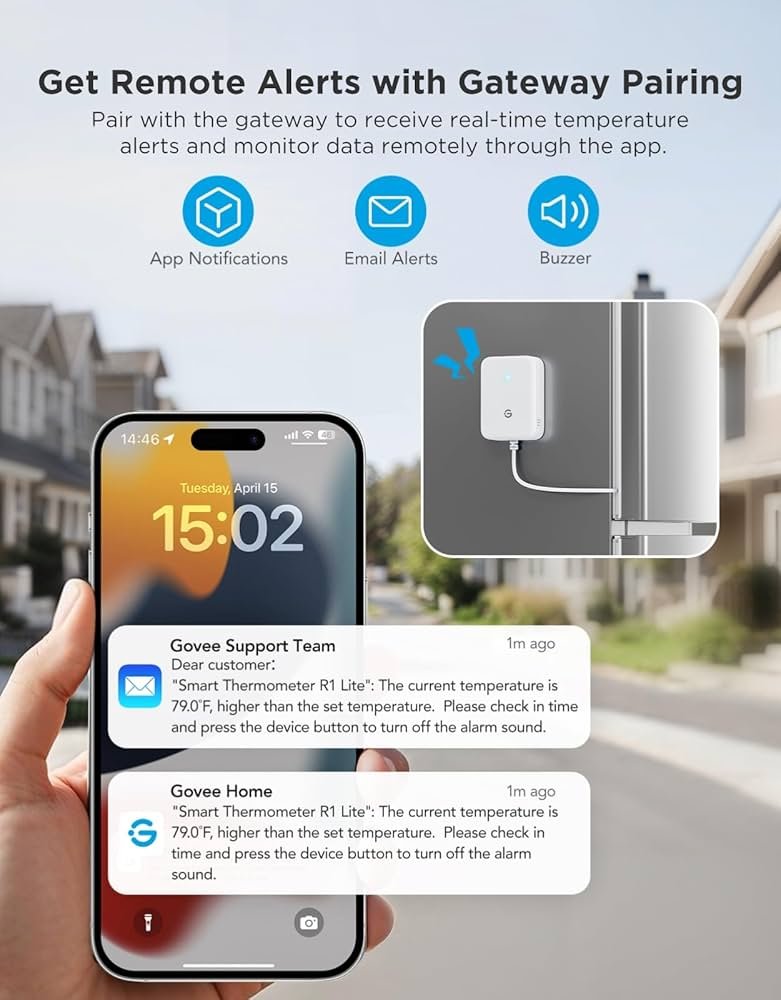
Setting up SMS and email alertshelps you receive quick updates. These alerts notify you when temperatures go above or below set limits. To connect, enter your phone number and email in the notification system. Confirm your contact details to start receiving alerts.
App notificationsprovide instant alerts on your phone or device. Many temperature monitoring systems link with popular apps like Slack, Telegram, or custom apps. This keeps you informed even when away from email or SMS.
| Notification Type | Advantages | Setup Notes |
|---|---|---|
| SMS Alerts | Fast, works without internet | Requires phone number verification |
| Email Alerts | Detailed messages, easy to archive | Needs valid email address |
| App Notifications | Real-time, interactive, customizable | Install and link app to system |

Credit: safesensepro.com
Testing Your Alerts
Testing alerts ensures they work correctly before relying on them. Send a test alert to check if notifications arrive on time and settings are accurate. Confirming alert function helps protect against temperature changes effectively.
Simulating Temperature Changes
Simulating temperature changes helps check if alerts work well. You can use a device or app to raise or lower the temperature. This shows how the system reacts to different levels. It is important to test both high and low temperature alerts. Make sure the alerts trigger at the right points. Testing saves trouble later and ensures the system is reliable.
Verifying Alert Delivery
Check if alerts reach the right devices like phones or emails. Test by sending alerts and confirming they arrive quickly. Look for any delays or missed messages. Confirm the alert message is clear and easy to understand. Keep contact info updated to avoid delivery problems. Good alert delivery means faster action and better safety.
Maintaining And Updating Alerts
Regular calibrationkeeps temperature alerts accurate. Devices can drift over time. Check sensors often to avoid false alarms. Calibration ensures alerts match real conditions. Use manufacturer guidelines for best results.
Adjusting alerts for seasonal changeshelps maintain relevance. Different seasons bring new temperature ranges. Update alert thresholds to reflect these changes. This avoids unnecessary warnings or missed alerts.
- Review alert settings at the start of each season.
- Lower or raise temperature limits based on weather.
- Test alerts after adjustments to confirm they work properly.
- Document changes for future reference and consistency.

Credit: www.amazon.com
Frequently Asked Questions
How Do I Set Temperature Alerts On My Device?
To set temperature alerts, access your device’s settings or app. Locate the temperature alert option. Enter your desired threshold values. Enable notifications to receive alerts when temperatures exceed limits.
Why Are Temperature Alerts Important For Monitoring?
Temperature alerts help prevent damage by notifying you of extreme heat or cold. They ensure safety, protect equipment, and maintain optimal conditions for sensitive environments.
Can Temperature Alerts Be Customized For Different Environments?
Yes, temperature alerts can be tailored to specific environments. You can set unique thresholds based on location, device type, or usage needs for precise monitoring.
What Devices Support Temperature Alert Features?
Many smart thermostats, IoT sensors, and environmental monitors support temperature alerts. Check your device specifications or app for compatibility and setup instructions.
Conclusion
Setting temperature alerts is simple and effective. It ensures safety and comfort. Follow the steps carefully to avoid mistakes. Alerts help monitor changing conditions. They protect your home and valuables. Always test your alerts regularly. This keeps your system reliable.
Stay informed and in control. Temperature alerts are a smart choice. They offer peace of mind. Save time and reduce stress. Make your environment safer today.