
Imagine having dinner ready without even stepping into your kitchen. Sounds like a dream, right?
With smart cookers, this is now possible. You can cook remotely, saving time and energy while still enjoying delicious homemade meals. Whether you’re at work or lounging on your couch, smart cookers offer an effortless cooking experience. In this guide, you’ll discover how to leverage these innovative appliances to transform your meal prep routine.
We’ll delve into the essentials of using smart cookers, helping you turn cooking from a chore into a seamless part of your day. Ready to revolutionize your kitchen habits? Let’s get started and unlock the potential of smart cooking!
Smart Cookers Overview
Smart cookers come in various types. Each has unique features. Some popular ones include smart slow cookers. They cook meals slowly, keeping flavors intact. Another type is the smart pressure cooker. It cooks food quickly under pressure. There are also smart rice cookers. They are perfect for cooking rice perfectly. Each type makes cooking easier and more fun.
Smart cookers have many features. They connect to your phone via apps. You can control them remotely. This means you can start cooking from anywhere. Another key feature is voice control. You can use devices like Alexa to control them. Many smart cookers have preset cooking modes. These modes make cooking different meals simple. The energy efficiencyof these cookers helps save electricity. They are a great addition to any kitchen.
Setting Up Your Smart Cooker
First, make sure the smart cooker is plugged in. Find the Wi-Fi button on the cooker. Press and hold the button for a few seconds. This will start the Wi-Fi setup. Open the settings on your phone. Choose the Wi-Fi network of the cooker. Enter the passwordif needed. Your cooker is now connected to Wi-Fi.
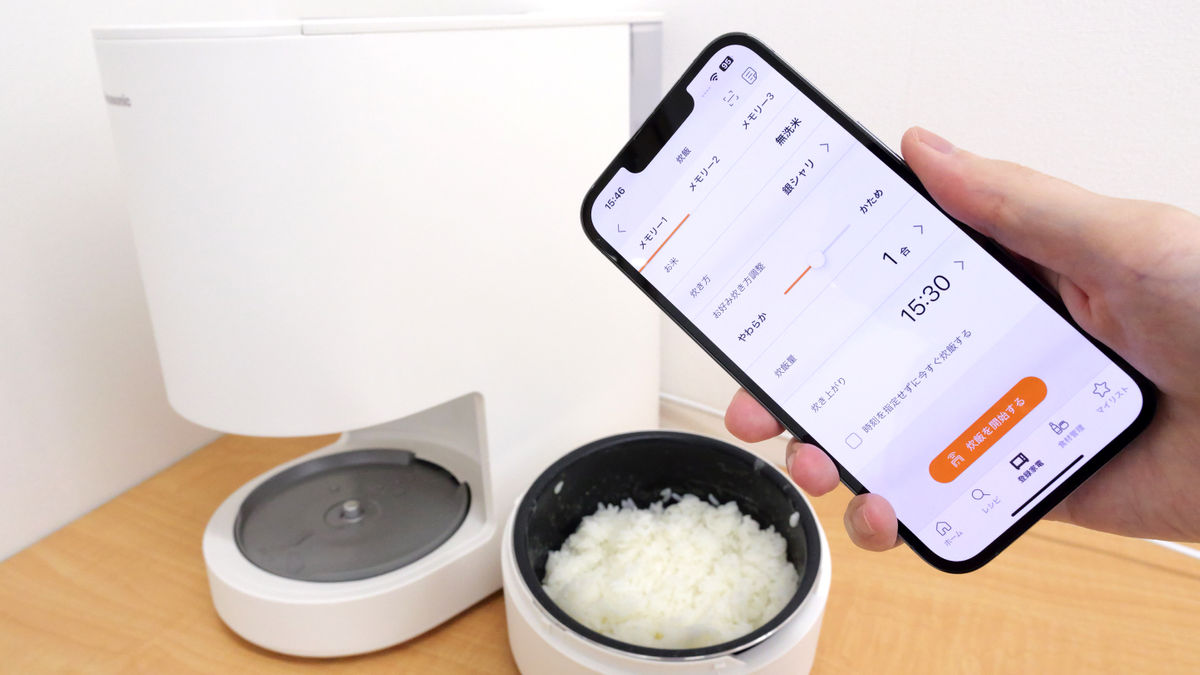
Download the smart cooker app on your phone. Open the app after installing it. Follow the app instructions. Connect the app to your smart cooker. You may need to enter a code. This code helps sync the app with the cooker. Once connected, you can controlthe cooker from your phone. Set cooking times and temperatures easily. Cooking becomes simple and fun.
Remote Cooking Techniques
Smart cookers let you set cooking times from anywhere. Use your phone or tablet to choose when the cooking starts. This helps you have meals ready when you get home. Set a timer for breakfast, lunch, or dinner. Smart cookers are handy for busy days. Plan meals without being in the kitchen. Family dinners are easier to manage. Feel relaxed knowing your food is cooking.
Change cooking settings with a tap on your device. Adjust temperature or cooking mode while you do other tasks. Start or pause cooking without being near the cooker. Ideal for people who multitask. Keep meals perfect even if plans change. Ensure food is cooked how you like it. Smart cookers give you control, even from far away. Cooking becomes simple and flexible.

Credit: oushine-tech.en.made-in-china.com
Popular Smart Cooker Recipes
Start your day with a hearty oatmeal. Use your smart cooker to prepare it. Add fruits and nuts for extra flavor. Another idea is a vegetable omelet. Smart cookers handle eggs well. Mix with your favorite veggies. Try breakfast quinoa too. It’s nutritious and tasty. Add berries or honey for sweetness.
Cook a simple chicken curry. Use spices and coconut milk. Serve with rice. Try vegetable stew for a light meal. Add potatoes, carrots, and beans. Pasta dishes work well too. Add tomato sauce and cheese. You can make a beef stew. Use beef, potatoes, and carrots. Let it cook slowly.
Make a delicious rice pudding. Use milk and sugar. Add cinnamon on top. Try a chocolate lava cake. The smart cooker melts chocolate just right. Prepare banana bread for a snack. It’s sweet and soft. Fruit compote is easy too. Use berries and sugar. Cook till it’s soft and juicy.
Troubleshooting Common Issues
Smart cookers make remote cooking simple, but they come with their own set of challenges. Connectivity issues often disrupt the cooking process, requiring a check of Wi-Fi settings. Incorrect app configurations lead to recipe mishaps; ensure settings match the desired cooking method.
Connectivity Problems
Smart cookers sometimes have trouble connectingto Wi-Fi. Make sure the Wi-Fi is on. Check if the cooker is near the router. Distance can affect the signal. Try restarting the cooker. A restart can fix many problems. Double-check the Wi-Fi password. An incorrect password stops connection. Update the cooker’s firmware regularly. Updates improve connection reliability. Ensure no metal objects block the signal. Metal can interfere with Wi-Fi signals.
App Malfunctions
App issues can be frustrating. First, check if the app is updated. New versions fix bugs. Restart the app to refresh it. Refreshing can solve temporary glitches. Clear the app cache if needed. Cache can cause performance issues. Reinstall the app to ensure stability. Sometimes, a fresh install helps. Review app permissions on your device. Permissions affect app functionality. Contact customer support for persistent issues. They can provide technical assistance.

Credit: www.amazon.sa
Maximizing Smart Cooker Efficiency
Smart cookers are great for saving energy. Use the right settings for each dish. This helps to save power. Preheat the cooker only when needed. It reduces energy use. Cook multiple items together if possible. It saves time and energy.
Keep the lid closed while cooking. It keeps the heat inside. Use the delay start feature. It helps cook when energy rates are low. Clean the cooker regularly. It improves performance and uses less power.
Regular cleaning keeps the cooker in good shape. Wipe it after each use. Check the cords and plugs for damage. Replace if needed. Keep the cooker in a dry place. Avoid water near electrical parts.
Use the cooker as per the manual. Follow safety tips. This ensures a long life for your cooker. Store the cooker properly. It prevents dust and dirt. Regular maintenance keeps it working well.
Future Trends In Smart Cooking
Smart cookers now have amazing technologies. They can connect to the Internet. This helps you control them from your phone. AI in smart cookers helps them cook perfectly. They know the right time and temperature. Smart cookers are getting better every year. Voice control is a new feature. You can talk to your cooker. It listens and follows your commands.
Smart cookers make cooking easier at home. They save time and effort. You can set the cooker and relax. Perfect meals are possible with smart cookers. They follow recipes exactly. Even kids can cook with them. Safety is also improved. Smart cookers shut off when done. No more burnt food. Cooking is now fun and safe.
Credit: gigazine.net
Frequently Asked Questions
How Does A Smart Cooker Work?
A smart cooker uses sensors and algorithms to automatically adjust cooking settings. It connects to your smartphone for remote control. Pre-set programs simplify cooking various dishes. It offers real-time monitoring and alerts, ensuring perfect results every time. Energy-efficient features save power while enhancing convenience and precision.
How To Connect Chef Iq To Phone?
Download the Chef IQ app from your phone’s app store. Open the app and follow the setup instructions. Enable Bluetooth on your phone and connect it to your Chef IQ device through the app. Ensure both devices are within Bluetooth range for a seamless connection.
Are Smart Cookers Worth It?
Smart cookers are worth it for convenience and efficiency. They save time with programmable settings and multi-functionality. These appliances often enhance cooking results while reducing effort. Investing in a smart cooker can simplify meal preparation, making them valuable for busy households and those seeking to streamline cooking processes.
Is The Chef Iq App Free?
Yes, the Chef IQ app is free to download. It offers various features for enhancing your cooking experience. Users can access recipes, cooking guides, and smart kitchen appliance integration without any charges. Enjoy a seamless cooking journey with this user-friendly app.
Conclusion
Smart cookers bring ease and convenience to cooking. They help you manage meals from afar. With simple controls, cooking becomes stress-free. Enjoy experimenting with new recipes. Save time for other important tasks. Smart cookers make meal preparation more efficient. Connect and cook, even when busy.
Perfect for modern lifestyles. You can enjoy delicious meals without constant supervision. Embrace technology in the kitchen. Cooking remotely adds flexibility to your routine. Discover the benefits of smart cookers today. Your kitchen experience will never be the same. Get started with smart cooking now.