
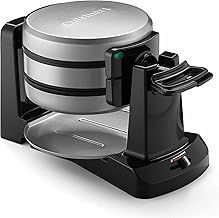
If you own a Cuisinart waffle maker, you know how important it is to keep it clean for the best waffles every time. But have you ever struggled with removing the plates?
It can be tricky if you don’t know the right steps. In this guide, you’ll learn exactly how to remove the plates from your Cuisinart waffle maker safely and easily. By following these simple instructions, you’ll save time, avoid damage, and make cleaning a breeze.
Keep reading to master this quick trick that will keep your waffle maker in perfect shape.
Safety First
Removing plates from your Cuisinart waffle maker needs care. Safety helps avoid burns and damage.
This guide explains how to do it safely by unplugging and cooling the plates first.
Unplugging The Waffle Maker
Always unplug the waffle maker before touching the plates. This stops electricity flow and lowers risk.
- Locate the power cord and switch off the device.
- Unplug the waffle maker from the wall socket carefully.
- Do not pull the cord; hold the plug firmly.
Allowing Plates To Cool
Let the plates cool completely before removing them. Hot plates can cause severe burns or damage.
| Cooling Time | Tips |
| 10 to 15 minutes | Keep the waffle maker open to speed cooling |
| Check temperature by touch | Use a cloth or oven mitt for safety |
| Do not rush removal | Wait until plates feel cool to the skin |

Credit: www.amazon.in
Locating The Release Mechanism
Removing the plates from your Cuisinart waffle maker is simple once you find the release mechanism. This part lets you detach the cooking plates safely and easily.
Different models use different types of release buttons or levers. Knowing where to look helps you avoid damage and clean the plates properly.
Types Of Release Buttons
Cuisinart waffle makers come with various release mechanisms. Some models have push buttons, while others use sliding levers or tabs.
- Push Button:A button on the side or front you press to release the plates.
- Sliding Lever:A small lever that slides sideways to unlock the plates.
- Tabs:Clips or tabs near the edge of the plates that you pull or push.
Checking The User Manual
The user manual is your best guide to find the release mechanism. It shows exact locations and explains how to remove plates safely.
| Manual Section | Description |
|---|---|
| Parts Overview | Diagram of all waffle maker parts, including release buttons. |
| Cleaning Instructions | Steps to remove and clean plates properly. |
| Safety Tips | Warnings and tips on handling hot plates and release mechanisms. |
Removing The Plates
Removing the plates from your Cuisinart waffle maker is simple. It helps to clean the appliance properly.
Follow the steps below to safely take out the plates without causing damage.
Pressing The Release Button
Locate the release button on the side of the waffle maker. This button unlocks the plates so you can remove them.
Press the button firmly but gently. You will hear a click, which means the plates are unlocked.
- Find the release button on the side
- Press it firmly to unlock
- Listen for the click sound
Gently Lifting The Plates
After pressing the release button, gently lift the plates upwards. Do not use too much force to avoid breaking the parts.
Hold the plates with both hands for better control. Lift them straight up and away from the waffle maker.
- Hold plates with both hands
- Lift plates straight up slowly
- Keep plates away from the machine

Credit: www.stflorenceschool.org
Cleaning The Plates
Removing and cleaning the plates of your Cuisinart waffle maker keeps it working well. Clean plates prevent old batter buildup and burnt spots. This guide helps you clean the plates safely and effectively.
Follow the instructions below to keep your waffle maker in good condition. You can clean the plates by hand or use a dishwasher.
Hand Washing Tips
Cleaning the plates by hand needs care to avoid damage. Use soft tools and mild soap to keep the non-stick surface safe.
- Let the plates cool down before cleaning.
- Remove loose crumbs with a soft brush or cloth.
- Use warm water and mild dish soap.
- Clean with a soft sponge or cloth. Avoid abrasive pads.
- Rinse thoroughly with warm water to remove soap.
- Dry plates with a soft towel or air dry completely.
- Do not soak plates for a long time to prevent damage.
Using Dishwasher Safely
Some Cuisinart waffle maker plates are dishwasher safe. Check your model’s manual to be sure before placing plates in the dishwasher.
| Dishwasher Use Tips | Details |
| Placement | Put plates on the top rack only to avoid heat damage. |
| Detergent | Use mild dishwasher detergent without bleach. |
| Cycle | Choose a gentle or normal wash cycle, no high heat dry. |
| Drying | Remove plates promptly to air dry or towel dry. |
Reinstalling The Plates
Reinstalling the plates on your Cuisinart waffle maker is easy if you follow the right steps. Proper reinstallation ensures the waffle maker works well and stays safe.
Make sure the plates are clean and dry before putting them back. This helps the plates fit correctly and prevents damage.
Aligning Plates Correctly
Start by lining up the plates with the slots on the waffle maker. The plates should fit smoothly without forcing them.
Check that the edges of the plates match the shape of the holder. This keeps the plates steady and balanced during use.
- Hold the plate near the edges
- Match the hooks on the plate to the slots on the machine
- Make sure the cooking surfaces face inward
- Slide the plate gently into place
Securing Plates In Place
After aligning, press the plates down until you hear a click or feel them lock. This means the plates are secure and ready to use.
Double-check that the plates do not move or wiggle. Loose plates may cause uneven cooking or damage the waffle maker.
- Press firmly but gently on each plate
- Listen for a locking sound
- Try to move the plate slightly to confirm it is locked
- Repeat for both top and bottom plates

Credit: www.stflorenceschool.org
Troubleshooting Plate Removal
Removing plates from a Cuisinart waffle maker can sometimes be tricky. Plates may stick due to food residue or heat. Knowing how to remove them safely prevents damage and keeps your appliance working well.
This guide helps you troubleshoot stuck plates and avoid problems during removal. Follow simple tips to handle your waffle maker correctly.
When Plates Are Stuck
Plates can stick because of hardened batter or leftover crumbs. Avoid forcing them out, which can break the locking mechanism.
- Unplug the waffle maker and let it cool completely.
- Use a plastic or wooden spatula to gently loosen edges.
- Apply a small amount of cooking oil around the plate edges.
- Wait 10 minutes for the oil to soften the residue.
- Try to slide the plate out carefully without twisting.
Avoiding Damage During Removal
Handling plates with care protects your waffle maker’s parts and keeps it working longer.
| Tip | Reason |
|---|---|
| Use soft tools like plastic spatulas | Prevents scratching non-stick surfaces |
| Never force plates out | Avoids breaking locking clips |
| Clean plates regularly | Reduces buildup that causes sticking |
| Follow manufacturer instructions | Ensures safe removal and replacement |
Frequently Asked Questions
How Do You Remove Plates From A Cuisinart Waffle Maker?
To remove plates from a Cuisinart waffle maker, first ensure the appliance is unplugged and cool. Locate the release buttons on each side of the plates. Press these buttons to unlock and gently lift the plates away from the waffle maker.
Always refer to your user manual for specific instructions.
Can You Wash Cuisinart Waffle Maker Plates In A Dishwasher?
Yes, most Cuisinart waffle maker plates are dishwasher-safe. After removing the plates, place them on the top rack of your dishwasher. Use a mild detergent for cleaning. Always check the manufacturer’s instructions in your user manual to confirm if your specific model is dishwasher-friendly.
What Tools Are Needed To Remove Waffle Maker Plates?
No special tools are required to remove Cuisinart waffle maker plates. Simply use your fingers to press the release buttons located on each side of the plates. Ensure the appliance is unplugged and cool before attempting to remove the plates for safety.
Are All Cuisinart Waffle Maker Plates Removable?
Not all Cuisinart waffle maker plates are removable. Some models feature fixed plates that require in-place cleaning. Check your specific model’s user manual for details on whether the plates are removable. This will ensure proper maintenance and care of your appliance.
Conclusion
Removing plates from your Cuisinart waffle maker is simple and safe. Always ensure the appliance is unplugged and cool before starting. Gently press the release buttons or latches to unlock the plates. Avoid using sharp tools to prevent damage. Clean the plates carefully after removal for better waffle taste.
Regular maintenance keeps your waffle maker working well. Now, enjoy making delicious waffles with ease and confidence. Easy steps, better waffles. That’s all you need.