
Imagine waking up to the perfect cup of coffee, ready the moment you step into the kitchen. Setting a timer on your drip coffee maker can make this a reality, saving you time and hassle every morning.
If you’ve ever struggled with figuring out how to program your coffee maker, you’re not alone. You’ll learn simple, step-by-step instructions to set the timer on your drip coffee maker easily. By the end, you’ll have fresh coffee waiting for you exactly when you want it—no more waiting, no more guesswork.
Let’s get started!
Credit: www.youtube.com
Timer Benefits
Setting a timer on a drip coffee maker brings many useful benefits. It helps you wake upto fresh coffee every morning. You save time by having coffee ready before you start your day. The timer lets you plan your brewingwithout rushing. It keeps coffee warm and fresh without needing to reheat. This way, coffee tastes better and stays hot longer. Using a timer also helps reduce energy usebecause the coffee maker only runs when needed. It adds convenience and makes your kitchen routine easier. A timer allows you to enjoy coffee exactly when you want it.
Types Of Drip Coffee Makers
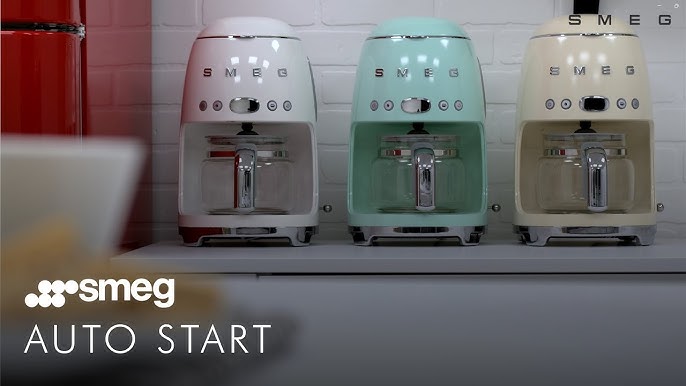
Drip coffee makers come in different types. Some have basic features. Others include timersand <strongprogrammable settings. These help start brewing at a set time.
There are two main types:
- Standard drip coffee makers: Simple to use. You pour water and coffee grounds. It brews coffee right away.
- Programmable drip coffee makers: Allow setting a timer. The machine brews coffee automatically at the set time.
Some advanced models have pause and servefeatures. This lets you pour coffee before brewing ends. Others have warm platesto keep coffee hot.
Locate The Timer Controls
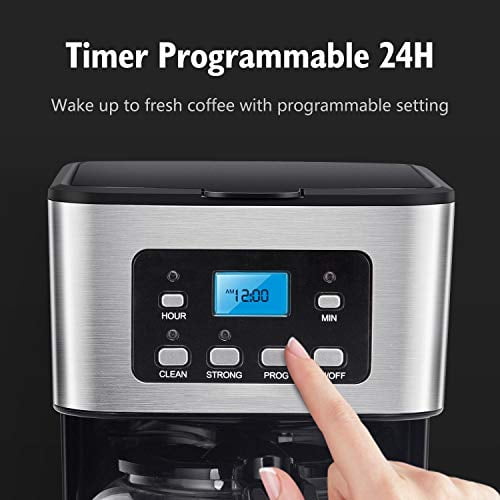
Locate the timer controlson your drip coffee maker. These are usually found on the front or side of the machine. Look for buttons or dials labeled with words like “Timer,”“Program,”or “Clock.”
Some models have a digital displayshowing the current time. Others have simple knobs or switches. Check your coffee maker’s manual if you are unsure.
- The timer controls let you set when coffee starts brewing.
- They often include buttons for hours and minutes.
- Some machines have an on/off switch for the timer.
Find the controls before setting the timer to avoid confusion. This makes the process quick and easy.
Set The Current Time
Find the clock or time button on the drip coffee maker. It is usually near the display screen.
Press and hold the clock button until the time starts flashing. Use the hour and minute buttons to set the current time.
Adjust the hours first. Make sure to set AM or PM correctly if the clock uses 12-hour format.
Press the minute button to set the minutes. Release the clock button once the correct time shows.
The display should stop flashing. This means the time is set.
Some models may require pressing the clock button again to confirm.
Program The Brew Time
First, find the program buttonon your drip coffee maker. Press it once to enter the timer setting mode. Use the hour and minute buttonsto set the time you want your coffee to start brewing. Make sure to set the time in 24-hour or AM/PM format, depending on your machine’s display.
After setting the desired brew time, press the program button againto save the setting. Check that the timer lightor symbol is on, confirming the timer is active. Place the coffee grounds and waterin the machine before the set time. The machine will start brewing automatically at the programmed time.
Credit: www.walmart.com
Add Coffee And Water
Place the coffee filter in the basket of the coffee maker. Measure the desired amount of coffee grounds. Add them into the filter. Use a clean cup to add water to the coffee maker. Find the water reservoir. Fill it with the right amount of water. Do not overfill. Close the lid securely.
Check if the coffee maker is plugged in. Ensure the power switch is off. Now, your coffee maker is ready for brewing. Always use fresh and clean water. This helps in making the best coffee.
Remember: Clean the coffee maker regularly. This keeps the coffee tasting good. Store coffee beans in a cool, dry place. This keeps them fresh longer. Enjoy your freshly brewed coffee!
Activate The Timer
First, locate the timer button on your coffee maker. It usually has a clock icon. Press it to enter the timer setting mode. Use the hour and minute buttons to set the time you want. Make sure the AM or PM is correct. This will help you avoid morning surprises. Once you set the time, press the timer button again to confirm.
Check if the display shows the correct time. This confirms the timer is active. Some coffee makers have an indicator light. This light shows the timer is set and ready. If your machine has a program button, press it after setting the time. This ensures your coffee brews at the right time.
Credit: www.vevor.com
Tips For Perfect Timing
Setting the timer on a drip coffee maker helps brew fresh coffee right on time. Most machines have a clock and timer button. Press the timer button, then use the hour and minute buttons to set the time you want the coffee to start brewing.
Make sure to fill the water reservoir and add coffee grounds before setting the timer. Double-check the AM or PM setting to avoid brewing at the wrong time. Some machines beep or show a light to confirm the timer is set.
- Use fresh water for better taste.
- Choose the right coffee grind size for drip machines.
- Clean the coffee maker regularly for best results.
- Set the timer at least 10 minutes before you want coffee ready.
Troubleshooting Timer Issues
Check if the power sourceis working properly. Sometimes, a loose plug or power outage causes timer issues. Make sure the clock is set correctly. The timer works only if the time is accurate. Reset the clock if needed.
Look for any error messageson the display. Consult the manual to understand these codes. Clean the timer buttons with a soft cloth. Dirt or moisture can make buttons sticky.
- Ensure the timer is enabledafter setting the time.
- Check if the water reservoiris full; some machines won’t start otherwise.
- Try unplugging the machine for a minute, then plug it back in.
Resetting the machine can fix minor bugs. If problems continue, contact customer supportfor help.
Frequently Asked Questions
How Do I Set The Timer On A Drip Coffee Maker?
To set the timer, fill the water reservoir and add coffee grounds. Press the “Program” button, set the desired brew time using hour and minute buttons, and confirm. The coffee maker will start brewing automatically at the set time.
Can I Schedule Brewing In Advance On Drip Coffee Makers?
Yes, most modern drip coffee makers have a programmable timer. You can schedule brewing up to 24 hours ahead. This feature lets you wake up to fresh coffee without manually starting the machine.
What If The Timer Doesn’t Start Brewing On Time?
Check if the clock is set correctly and the timer is programmed properly. Ensure the coffee maker is plugged in and the “Program” mode is activated. Consult the user manual for model-specific troubleshooting steps.
Is The Timer Feature Available On All Drip Coffee Makers?
No, not all drip coffee makers have a timer. Programmable timers are common in mid to high-end models. Check product specifications before purchase if a timer function is important to you.
Conclusion
Setting a timer on your drip coffee maker saves time and effort. You wake up to fresh coffee every day. The process is simple and quick to learn. Just follow the steps, and you’re ready. Enjoy warm coffee without waiting or rushing.
Small changes like this improve your daily routine. Try it today and feel the difference.